Faculty FTE Resources
last updated: Aug 20, 2026
Contents:
Faculty FTE Overview
When a faculty Full-Time Equivalent (FTE) becomes available—typically due to a departmental budget change, retirement, or school growth—the university follows a structured, multi-step process to convert that opportunity into a staffed faculty appointment.
The process begins when the Executive Vice Chancellor approves the allocation of FTE to a school, allowing the school to formally initiate an academic recruitment. Once the position is filled, and throughout the lifecycle of the appointment, elements of the job are simultaneously managed in distinct enterprise systems.
| Platform | Components Managed |
|---|---|
| FTE Registry | Academic Affair's tool that tracks FTE resources including historical allocations, non-salary funding responsibilities, and position memorandums of understanding (MOUs). |
| AP Data | Academic Personnel's database for the preparation, submission, and processing of academic appointment and review files. |
| UCPath | Manages the payroll, benefits and other human resources transactions across the entire University of California system. |
Eventually the position becomes vacant again, and the FTE returns to the Executive Vice Chancellor for reallocation.
Faculty FTE Request Form
submit a requestThe Faculty FTE Request Form is a tool that schools may use to initiate the following FTE actions:
- FTE Allocation - Request actions regarding an FTE allocation:
- Net New - requesting a brand new FTE for recruitment.
- Separation Return or Advanced Recruitment - requesting to use the FTE from a recent/upcoming separation for a new recruitment.
- Spousal Hire - requesting a spousal hire in order to attract a faculty being recruited or to retain an existing faculty member.
- Position Upgrade - Upgrade a previously approved FTE recruitment.
- When a recruitment search yields a qualified candidate that is above the approved rank/step, the school may request to upgrade the position in order to pursue the higher level candidate(s).
- Budget Reduction - Release FTE for budget reduction purposes.
- When a school elects to release previously held FTE instead of requesting that it be reallocated for the sake of permanently reducing their salary budget.
At minimum, requests must be approved by the school, Academic Affairs Finance & Administration (AAFA), and the Executive Vice Chancellor (EVC). For requests that include multiple participating departments, additional approvers are also required. See this routing diagram for the complete approval workflow.
To learn more, visit the Faculty FTE Request Form Instruction Guide or Contact Us.
Registry Open
Data from UCPath through Aug 5, 2026, has been integrated and the Registry is open! The Registry data is always in motion, often with clarifications pending. The next integration will take place in mid-September.Faculty FTE Registry
The Faculty FTE Registry Structure is Complete!
The campus system of record for authorized faculty full-time equivalents (FTEs) is now available for authorized users!
-
Access to the Registry is limited and controlled by AAFA-Finance and School Assistant Deans.
-
Tracks ladder-rank faculty positions from initial authorization through active occupation, periods of vacancy, ongoing recruitment, and more.
-
Bridges the formal authorization process managed by the Office of the EVC with the operational payroll data maintained in UCPath, providing a single authoritative view of the faculty landscape across schools and departments in Academic Affairs.
-
Designed to assist the EVC and school Assistant Deans in planning recruitment needs.
-
Most individual pages will contain additional details about that page. See Page Info Guides below.
- First time users are invited to review these slides: Intro to the Faculty FTE Registry.
Navigation Bar
Open FTE
This section includes information about Hiring Plans (aka Recruitments), Unallocated FTE, and Disposed FTE.
Occupied FTE
This section includes:
- FTE and appointed faculty in each School
- Split Appointments
- All Occupied by Dept
EVC Views
This area is dedicated to reports and lists:
- EVC Summary Grids - reports for All FTE, Colleges, and each School
- All Faculty - list of all faculty, including historical
- All Claims - list of FTE Claims on portions of appointments
- Disposed FTE - list of all FTE IDs that have been disposed
EVC Staff Tools
This section is only accessible to the Registry Developer and Manager
Utility
This section contains lists of definitions for terminology, types, codes, users and roles.
UCP
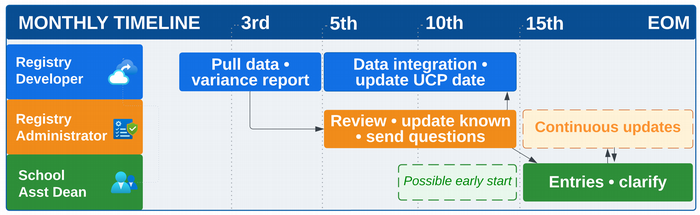
The date displayed represents the most recent data pull from UCPath. Reports are run and evaluated for adjustments to the Registry. Updates are confirmed, as needed, with the Schools before the data is fully integrated in the Registry.
Page Info
The 'Page Info' guides are located throughout the Faculty FTE Registry. While the link name appears the same on all pages, the information presented will contain key elements about the page you are viewing.
Contact Us
Use the Contact Us link to contact the AAFA Faculty FTE Resources Team regarding access requests, questions, edits or suggestions for the Registry, forms and website.
----------------------------------------------------
UCPath Update Process
Effective September 1, 2026, the following UCPath data update process will begin and continue monthly unless otherwise communicated.
Registry Utility Pages
Access to the Faculty FTE Registry is required to view the Utilities tab pages.
- Claim Types
- Department Hierarchy
- Disposal Types
- Employee Status Codes
- EVC Control Status
- FTE Types
- Initiatives
- Job Codes
- Key Terms
- Recruitment Status
- User List
- User Roles
Page Info Guides
These 'Page Info' guides are located throughout the Faculty FTE Registry and contain key elements of information presented on the named page types.
- FTE ID
- No Info
- Open FTE
Contact Us
Contact UsUse the button to contact the AAFA Faculty FTE Resources Team regarding the Registry, FTE Request Form or this Website:
- Data Edits (that are not corrected by a UCPath entry)
- Questions
- Registry Access Request
- Suggestions